# Writing `rm` because of Windows
## Problem
I happen to have a Windows laptop in my possession, and I'm stubborn enough to
use it for coding in addition to my work MacBook. Fortunately, I am also
stubborn enough to get it to work.
### _rm -rf_ doesn't work on Windows.
Powershell has _[Remove-Item]_ aliased to _rm_. This would almost solve the
problem, but...
```
Remove-Item : A parameter cannot be found that matches parameter name 'rf'.
At line:1 char:4
+ rm -rf dist
```
Powershell, unlike _[getopt]_, doesn't allow specifying multiple options
together.
_rm -r -f_ doesn't work too, because _-f_ is ambiguous.
```
Remove-Item : Parameter cannot be processed because the parameter name 'f' is ambiguous.
Possible matches include: -Filter -Force.
At line:1 char:7
+ rm -r -f dist
```
All right, for a few months I've been writing _rm -r -fo_ whenever I had to
remove `node_modules`.
I aliased[^1] it to _rmrf_ for convenience and with the following
```powershell
function rmrf {
param(
[parameter(Position=0)][string]$directory
)
process {
# rm -r -fo $directory
Remove-Item -Recurse -Force $directory
}
}
```
[^1]:
Powershell aliases can't be used to partially apply arguments. Docs for
_[Set-Alias]_ basically tell you to write a function instead.
[remove-item]:
https://docs.microsoft.com/en-us/powershell/module/microsoft.powershell.management/remove-item?view=powershell-7.2
[getopt]: https://en.wikipedia.org/wiki/Getopt
[set-alias]:
https://docs.microsoft.com/en-us/powershell/module/microsoft.powershell.utility/set-alias?view=powershell-7#example-5-create-an-alias-for-a-command-with-parameters
That was working nicely, until I landed in an environment where everybody except
of me had a MacBook and all scripts were written with that assumption.
### Alias was not enough
When I started my career in Polish software companies, we often had somebody on
MacOS, somebody on Linux and somebody on Windows in the team. Mac was a bit more
popular as a standard _company issued notebook for developers_, but we usually
had a mix.
When I work on open source, the projects are usually system agnostic (it's not
super hard in web ecosystem), using `rimraf` instead of `rm -rf`, using
`dotenv`, writing scripts in JavaScript or Python etc.
[`rimraf`]: https://www.npmjs.com/package/rimraf
Surprisingly, 41.2% StackOverflow Survey respondents use Windows and only 30%
use MacOS.
[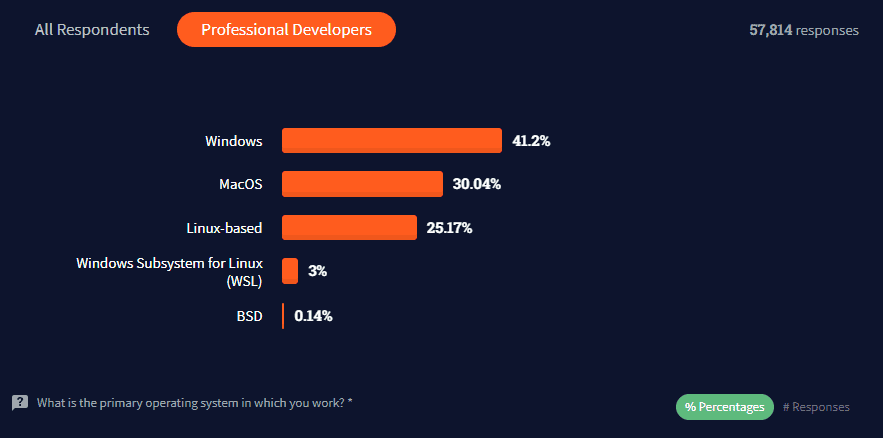](https://insights.stackoverflow.com/survey/2021#most-popular-technologies-op-sys-prof)
My anecdata looks more like 75% MacOS, 15% Linux, 10% Windows, but from a
perspective of open source guy, I wouldn't want to break the build for 10% of
users or lose 10% of contributors.
However, in a startup setting, the situation is totally different.
The company offered to buy me a Mac, but the orders take about 7 weeks. So, I
had a choice. I could either bother my teammates to make the project
system-agnostic, or deal with it on my side.
A smarter man might have gone to the store, get any MacBook they have, and be
done with it.
## Writing my own `rm` in Rust
Googling "rm for Windows" didn't get me any useful results, so I quickly wrote
my own, very dirty, totally not production-grade, `rm` to stick in my `bin`
directory.
**Disclaimer:** Writing the code took me less time than I've been writing this
note, so I provide no guarantees to the quality and correctness of the code. I
didn't even write any error messages, because exposing the error from `std::fs`
is totally fine for my use case.
main.rs
```rust
use clap::Parser;
#[derive(Parser, Debug)]
#[clap(author, version, about, long_about = None)]
struct Args {
#[clap(short, long)]
recursive: bool,
#[clap(short, long)]
force: bool,
#[clap()]
files: Vec,
}
fn rm(args: Args) -> std::io::Result<()> {
for file in args.files {
if args.recursive {
if args.force {
std::fs::remove_dir_all(file)?;
} else {
std::fs::remove_dir(file)?;
}
} else {
std::fs::remove_file(file)?;
}
}
return std::io::Result::Ok(());
}
fn main() {
let args = Args::parse();
Result::unwrap(rm(args))
}
```
Cargo.toml
```toml
[package]
name = "rust-rm"
version = "0.1.0"
edition = "2021"
[dependencies]
clap = { version = "3.1.18", features = ["derive"] }
```
I removed the alias by adding the following to my `$PROFILE`.
```powershell
Remove-Item -Path Alias:rm
```
I promptly ran `cargo build --release` and I added my newest toy to a directory
I already had in `PATH`.
```
❯ ls
Directory: D:\tools\bin
Mode LastWriteTime Length Name
---- ------------- ------ ----
-a---- 04/05/2022 16:24 1128 colormode.ps1
-a---- 11/05/2022 17:00 654848 rm.exe
-a---- 12/07/2021 16:21 8 sh.cmd
-a---- 07/07/2021 15:01 782336 tr.exe
-a---- 20/07/2021 13:16 637 xargs.cmd
```